Untitled
Monday, July 8, 2013


Thursday, May 30, 2013
HTML 5 And CSS 3
Fullscreen Backgrounds With CSS3
- html {
- background: url('images/bg.jpg') no-repeat center center fixed;
- -webkit-background-size: cover;
- -moz-background-size: cover;
- -o-background-size: cover;
- background-size: cover;
- }
Thursday, April 18, 2013
BiodiverCity Photo Contest Winners
Nature Forever Society BiodiverCity Photo Contest Winners
I prize- Mr. S. Thangaraj

Pelican on high tension wire.
The photograph is rated as a good example of how the birds are adapting to urbanization perfectly depicting the theme of the photo contest. It is also showcases the plight of these birds and many other such birds that are falling short of roosting/perching sites due to their habitat being destructed for the sake of creating concrete jungles and so are looking out for alternative sites.
The photograph is rated as a good example of how the birds are adapting to urbanization perfectly depicting the theme of the photo contest. It is also showcases the plight of these birds and many other such birds that are falling short of roosting/perching sites due to their habitat being destructed for the sake of creating concrete jungles and so are looking out for alternative sites.
Monday, March 25, 2013
Pendrive as RAM memory in windows xp
How to use pendrive as ram memory in windows xp!!
8) Now, from the local drives list, click on your Pen Drive letter.
Then Select the Option Custom Size after than
Set the Initial Size and Maximum Size as
depend upon your Pen drive Space....
A very very Important Suggestion to UNDO this
Follow till Step 7 after that set the initial size and maximum size to value 0 (ZERO).Click SET then select the option no paging file button.Once you do this DO NOT REMOVE YOUR DRIVE.
MAKE SURE TO SHUTDOWN YOU COMPUTER FIRST.
OK NOW ITS SAFE TO PULL OUT......
Here is the required procedure for converting USB/pendrive memory into RAM manually…
1) Plug your pendrive into PC/laptop (Minimum 2GB Maximum 4GB
for better Performance). Format your Pen drive with FAT file System.
2) Right Click On My Computer.
3) Open up properties.
4) Go to Advanced Option.
5) Now select Settings of Performance.
6) Again Click on the Advanced Button which is shown
In the popup Window.
7) Now click on Change button shown in Virtual memory.
Then Select the Option Custom Size after than
Set the Initial Size and Maximum Size as
depend upon your Pen drive Space....
9) After than click on Set and apply the changes.
10) Restart your PC/Laptop and Thus you are done.
A very very Important Suggestion to UNDO this
Follow till Step 7 after that set the initial size and maximum size to value 0 (ZERO).Click SET then select the option no paging file button.Once you do this DO NOT REMOVE YOUR DRIVE.
MAKE SURE TO SHUTDOWN YOU COMPUTER FIRST.
OK NOW ITS SAFE TO PULL OUT......
Thursday, March 7, 2013
Convert Sketch up file to OBJ
ZbylsXExporter
ZbylsXExporter is a DirectX .X, Ogre3d .mesh.xml and WaveFront .Obj File Exporter for Google SketchUp 8.
Exported .obj files are accompanied by an .mtl file with meterial definitions.
Exported .mesh.xml files are accompanied by an .material file with meterial definitions.
Exported .mesh.xml files are accompanied by an .material file with meterial definitions.
To install this extension unzip attached archive, then in SketchUp go to menu "Window > Preferences" then click "Extensions", click "Install Extension..." and choose extracted ZbylsXExporter.rbz file.
Version Requirement:
SketchUp 8.0Tuesday, February 26, 2013
Retrive Quick Launch Missing in Windows XP
1.Open Windows Explorer
2. Go to the path "C:\Documents and Settings\<usernmae>\Application Data\Microsoft\Internet Explorer\Quick Launch
3. if not exists create a folder "Quick Launch "
4. Create a text document using notepad
5.Copy&Paste type the following command
[Shell]
Command=2
IconFile=explorer.exe,3
[Taskbar]
Command=ToggleDesktop
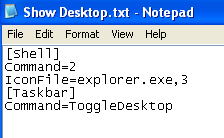
6. and Save As

7. Right Click on the Taskbar

2. Go to the path "C:\Documents and Settings\<usernmae>\Application Data\Microsoft\Internet Explorer\Quick Launch
3. if not exists create a folder "Quick Launch "
4. Create a text document using notepad
5.Copy&Paste type the following command
[Shell]
Command=2
IconFile=explorer.exe,3
[Taskbar]
Command=ToggleDesktop
6. and Save As

7. Right Click on the Taskbar

8. Finally Quick launch will appear.
Tuesday, January 8, 2013
Subscribe to:
Posts (Atom)