const remainItems = this.allImages.filter(v => this.loadedImagesArray.every(c => c.idx != v.idx));
Tuesday, March 8, 2022


Monday, March 27, 2017
Find different between start date and current date in Local Storage using Javascript
Find different between start date and current date in Local Storage using Javascript
if (localStorage.getItem('bookname_1') == null) {
var coeff = 1000 * 60 * 5;
var date = new Date(); //or use any other date
var rounded = new Date(Math.round(date.getTime() / coeff) * coeff)
console.log(rounded)
localStorage.setItem('bookname_1' , rounded);
}else{
var regDate=localStorage.getItem('bookname_1')
regDate=new Date(regDate)
var now = new Date();
var one_day=1000*60*60*24;
var diffDays = Math.round(Math.abs((now.getTime() - regDate.getTime())/(one_day)));
alert(diffDays)
if(diffDays>=2){// change days here
document.getElementById('black').style.display = 'block';
}
}
Tuesday, October 13, 2015
Jquery Compare two array
var array1 = [1, 2, 3, 4, 5, 6];
var array2 = [1, 2, 3, 4, 5, 6, 7, 8, 9];
var diff = [];
var same=[];
jQuery.grep(array2, function(el) {
if (jQuery.inArray(el, array1) == -1) diff.push(el);
if (jQuery.inArray(el, array1) != -1) same.push(el);
});
alert(" the difference is " + diff+"same is "+same);
Compare Two array are same
var array1 = [4,8,9,10];
var array2 = [4,8,9,10];
var is_same = array1.length == array2.length && array1.every(function(element, index) {
return element === array2[index];
});
console.log(is_same);
for(j=0;j<final_ans.length;j++){
if(get_ans[j] != final_ans[j]){
console.log(get_ans[j]+' ------------------not equal---+'+ "#" + get_ans_id[j]+"li div" +'---------- '+final_ans[j] )
$("#" + get_ans_id[j]+" li div").addClass("wrong");
$("#" + get_ans_id[j]+" li div").css("display", "block");
}
else{
// $('#msg').val('')
console.log(get_ans[j]+' ---------------equal---------------- '+final_ans[j] )
$("#" + get_ans_id[j]+" li div").addClass("correct");
$("#" + get_ans_id[j]+" li div").css("display", "block");
}
}
var array2 = [1, 2, 3, 4, 5, 6, 7, 8, 9];
var diff = [];
var same=[];
jQuery.grep(array2, function(el) {
if (jQuery.inArray(el, array1) == -1) diff.push(el);
if (jQuery.inArray(el, array1) != -1) same.push(el);
});
alert(" the difference is " + diff+"same is "+same);
Compare Two array are same
var array1 = [4,8,9,10];
var array2 = [4,8,9,10];
var is_same = array1.length == array2.length && array1.every(function(element, index) {
return element === array2[index];
});
console.log(is_same);
for(j=0;j<final_ans.length;j++){
if(get_ans[j] != final_ans[j]){
console.log(get_ans[j]+' ------------------not equal---+'+ "#" + get_ans_id[j]+"li div" +'---------- '+final_ans[j] )
$("#" + get_ans_id[j]+" li div").addClass("wrong");
$("#" + get_ans_id[j]+" li div").css("display", "block");
}
else{
// $('#msg').val('')
console.log(get_ans[j]+' ---------------equal---------------- '+final_ans[j] )
$("#" + get_ans_id[j]+" li div").addClass("correct");
$("#" + get_ans_id[j]+" li div").css("display", "block");
}
}
Wednesday, July 15, 2015
Passing Scores from Flash Games to LMS & CMS
http://elearningbrothers.com/passing-scores-from-flash-games-to-lectora/
http://pipwerks.com/
https://code.google.com/p/swf-activity-module/w/list
Friday, January 16, 2015
HTML5 Misc
Types of Layout in HTML5
- Fixed websites have a set width and resizing the browser or viewing it on different devices won’t affect on the way the website looks.

- Fluid websites are built using percentages for widths. As a result, columns are relative to one another and the browser allowing it to scale up and down fluidly.
- Adaptive websites introduce media queries to target specific device sizes, like smaller monitors, tablets, and mobile.
- Responsive websites are built on a fluid grid and use media queries to control the design and its content as it scales down or up with the browser or device.
Hide HTML5 video 'Controls' for Browser and iPad
<video id="video" controls src="video.mp4" poster="image.jpg" preload="auto" onplaying="this.controls=false"/></video>
HitTest on Transparent PNG Jquery plugin
This plugin allow to test dom objects collision and coordinates hitTest.The collision detection works on mobile and on desktop. It manage image and canvas transparency on rencent web browsers. The transparency is manage on canvas elements compatible web browsers.(on old web browsers, the tests are done on rectangular areas)


http://e-smartdev.com/en/#!jsPluginList/hittestJQuery
Tuesday, May 27, 2014
Front-End Development Frameworks
1. Bootstrap
http://getbootstrap.com/
(http://bootsnipp.com/resources)
2. Fbootstrapp
http://ckrack.github.io/fbootstrapp/
3. BootMetro
http://aozora.github.io/bootmetro/
4. Kickstrap
http://getkickstrap.com/
5. Foundation
http://foundation.zurb.com/
6. GroundworkCSS
http://groundworkcss.github.io/
7. Gumby
http://gumbyframework.com/
8. HTML KickStart
http://www.99lime.com/
9. IVORY
http://weice.in/ivory/
10. Kube
http://imperavi.com/kube/
http://getbootstrap.com/
(http://bootsnipp.com/resources)
2. Fbootstrapp
http://ckrack.github.io/fbootstrapp/
3. BootMetro
http://aozora.github.io/bootmetro/
4. Kickstrap
http://getkickstrap.com/
5. Foundation
http://foundation.zurb.com/
6. GroundworkCSS
http://groundworkcss.github.io/
7. Gumby
http://gumbyframework.com/
8. HTML KickStart
http://www.99lime.com/
9. IVORY
http://weice.in/ivory/
10. Kube
http://imperavi.com/kube/
Monday, April 7, 2014
Tuesday, March 4, 2014
Live, Web-Based Browser Testing
Instant access to all desktop and mobile browsers.Say goodbye to your setup of virtual machines and devices.
http://www.browserstack.com/
Thursday, February 20, 2014
Tips and Tricks, Flash, HTML5, CSS3, Jquery, Media
Background image fit to Browser when resizing
Stretch
html, body {
    margin:0;
    padding:0;
    height: 100%;
}
#background {
    background : #000000 url("your image") no-repeat bottom left;
    background-size: 100% 100%;
    min-height:100%;
}
Cover
html{
    /* This image will be displayed fullscreen */
    background:url('background.jpg') no-repeat center center;

    /* Ensure the html element always takes up the full height of the browser window */
    min-height:100%;

    /* The Magic */
    background-size:cover;
}

body{
    /* Workaround for some mobile browsers */
    min-height:100%;
}
Links for HTML and JS utilities
Online code beautifier
http://ctrlq.org/beautifier/prettyPhoto
prettyPhoto is a jQuery lightbox clone. Not only does it support images, it also support for videos, flash, YouTube, iframes and ajax. It’s a full blown media lightbox.”http://www.no-margin-for-errors.com/projects/prettyphoto-jquery-lightbox-clone
tablesorter
tablesorter is a jQuery plugin for turning a
standard HTML table with THEAD and TBODY tags into a sortable table without page refreshes
Time Picker Javascript
jquery.timepickr.jsTUTORIALS on latest components
Amazing jquery Plugins
http://tutorialzine.com/2013/04/50-amazing-jquery-plugins/Wednesday, January 22, 2014
Choose the Widescreen Size Format in PowerPoint
Choose the Widescreen Size Format in PowerPoint 2003

The most commonly chosen widescreen ratio is 16:9.
- In the Page Setup
dialog box, under the heading Slides sized for: choose Custom
- set the width as 10
inches
- set the height as 5.63
inches
- Click OK.
Choose the Widescreen Size Format in PowerPoint 2007

There are two different widescreen size ratios available in PowerPoint 2007. The choice you make will depend on your particular monitor. The most commonly chosen widescreen ratio is 16:9.
- In the Page Setup dialog box, under the heading Slides sized for: choose On-screen Show (16:9)
- the width will be 10 inches
- the height will be 5.63 inches
Note - If you choose the ratio 16:10 the width and height measurements will be 10 inches by 6.25 inches.
- Click OK.
Monday, December 30, 2013
Wednesday, December 11, 2013
epub Video Properties compression and Conversion
EPub Video conversion setting
Video settings
Framerate : same as source
Field Order : None(Progressive)
Profile : Main, Baseline, high
Level : 3.0 to 4.0
Bitrate encoding : VBR And CBR (mentioned Below)
Maximum Bitrate : 1.4 Mbps
Audio Settings:
Codec : AACOutput : based on requirements (Mono & Stereo)
Frequency : 44.1 kHz
Bitrate : 160 too 256 Kbps

A frame size of 640x360 and a bit-rate of 1.4 Mbps (mega-bits per second) using the MPEG-4 Baseline Profile should produce pristine video for most HD (16:9) sourced content.
Baseline@3.0 when the source is 1280x720. This is much better for 16:9 source.
* Video: H.264 Baseline Profile Level 3.0 (iPhone/iPod Touch), Main Profile Level 3.1 (iPad 1,2)
The following audio and video formats are supported:
Video: H.264 Baseline Profile Level 3.0 (iPhone/iPod Touch), Main Profile Level 3.1 (iPad 1,2), High Profile Level 4.1 (new iPad), MPEG-4 Simple Profile (iPhone/iPod Touch/iPad), Motion JPEG (M-JPEG) (iPod Touch 4th Gen, iPhone 4, iPad)
Audio: HE-AAC or AAC-LC up to 48 kHz, stereo audio OR
MP3 (MPEG-1 Audio Layer 3) 8 kHz to 48 kHz, stereo audio
Variable Bitrate
Variable Bitrate, or VBR, refers to a video or audio stream encoded with variance in bitrate over time. While Constant Bitrate (CBR) encoding divides the bits evenly throughout the stream, the bitrate of a VBR encoded stream may have large changes over time. Variable Bitrate encoding implies that some sort of Compression is being applied. While this is often Lossy Compression, it can also be lossless.
VBR And CBR Video
VBR video will usually give you better quality than CBR for severely bitrate Limited formats, including DVD and MPEG-4. Formats designed more for editing, like DV, are better suited for CBR.
Monday, July 8, 2013
Thursday, May 30, 2013
HTML 5 And CSS 3
Fullscreen Backgrounds With CSS3
- html {
- background: url('images/bg.jpg') no-repeat center center fixed;
- -webkit-background-size: cover;
- -moz-background-size: cover;
- -o-background-size: cover;
- background-size: cover;
- }
Thursday, April 18, 2013
BiodiverCity Photo Contest Winners
Nature Forever Society BiodiverCity Photo Contest Winners
I prize- Mr. S. Thangaraj

Pelican on high tension wire.
The photograph is rated as a good example of how the birds are adapting to urbanization perfectly depicting the theme of the photo contest. It is also showcases the plight of these birds and many other such birds that are falling short of roosting/perching sites due to their habitat being destructed for the sake of creating concrete jungles and so are looking out for alternative sites.
The photograph is rated as a good example of how the birds are adapting to urbanization perfectly depicting the theme of the photo contest. It is also showcases the plight of these birds and many other such birds that are falling short of roosting/perching sites due to their habitat being destructed for the sake of creating concrete jungles and so are looking out for alternative sites.
Monday, March 25, 2013
Pendrive as RAM memory in windows xp
How to use pendrive as ram memory in windows xp!!
8) Now, from the local drives list, click on your Pen Drive letter.
Then Select the Option Custom Size after than
Set the Initial Size and Maximum Size as
depend upon your Pen drive Space....
A very very Important Suggestion to UNDO this
Follow till Step 7 after that set the initial size and maximum size to value 0 (ZERO).Click SET then select the option no paging file button.Once you do this DO NOT REMOVE YOUR DRIVE.
MAKE SURE TO SHUTDOWN YOU COMPUTER FIRST.
OK NOW ITS SAFE TO PULL OUT......
Here is the required procedure for converting USB/pendrive memory into RAM manually…
1) Plug your pendrive into PC/laptop (Minimum 2GB Maximum 4GB
for better Performance). Format your Pen drive with FAT file System.
2) Right Click On My Computer.
3) Open up properties.
4) Go to Advanced Option.
5) Now select Settings of Performance.
6) Again Click on the Advanced Button which is shown
In the popup Window.
7) Now click on Change button shown in Virtual memory.
Then Select the Option Custom Size after than
Set the Initial Size and Maximum Size as
depend upon your Pen drive Space....
9) After than click on Set and apply the changes.
10) Restart your PC/Laptop and Thus you are done.
A very very Important Suggestion to UNDO this
Follow till Step 7 after that set the initial size and maximum size to value 0 (ZERO).Click SET then select the option no paging file button.Once you do this DO NOT REMOVE YOUR DRIVE.
MAKE SURE TO SHUTDOWN YOU COMPUTER FIRST.
OK NOW ITS SAFE TO PULL OUT......
Thursday, March 7, 2013
Convert Sketch up file to OBJ
ZbylsXExporter
ZbylsXExporter is a DirectX .X, Ogre3d .mesh.xml and WaveFront .Obj File Exporter for Google SketchUp 8.
Exported .obj files are accompanied by an .mtl file with meterial definitions.
Exported .mesh.xml files are accompanied by an .material file with meterial definitions.
Exported .mesh.xml files are accompanied by an .material file with meterial definitions.
To install this extension unzip attached archive, then in SketchUp go to menu "Window > Preferences" then click "Extensions", click "Install Extension..." and choose extracted ZbylsXExporter.rbz file.
Version Requirement:
SketchUp 8.0Tuesday, February 26, 2013
Retrive Quick Launch Missing in Windows XP
1.Open Windows Explorer
2. Go to the path "C:\Documents and Settings\<usernmae>\Application Data\Microsoft\Internet Explorer\Quick Launch
3. if not exists create a folder "Quick Launch "
4. Create a text document using notepad
5.Copy&Paste type the following command
[Shell]
Command=2
IconFile=explorer.exe,3
[Taskbar]
Command=ToggleDesktop
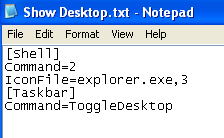
6. and Save As

7. Right Click on the Taskbar

2. Go to the path "C:\Documents and Settings\<usernmae>\Application Data\Microsoft\Internet Explorer\Quick Launch
3. if not exists create a folder "Quick Launch "
4. Create a text document using notepad
5.Copy&Paste type the following command
[Shell]
Command=2
IconFile=explorer.exe,3
[Taskbar]
Command=ToggleDesktop
6. and Save As

7. Right Click on the Taskbar

8. Finally Quick launch will appear.
Tuesday, January 8, 2013
Subscribe to:
Posts (Atom)